Genmitsu 3018-PROVer V2 CNC Machine
Stewart's Notes
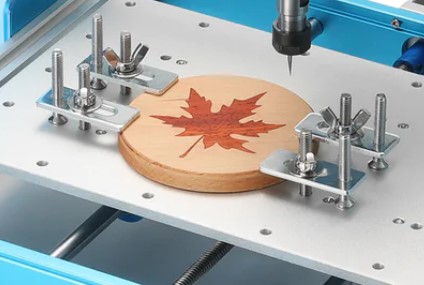
Clamp Kit Usage. Note flat head screws are upside down.
Threaded rods screw into base plate and the plates secured with washers and wingnuts.
Z-Axis limit switches
The CNC shipped with 5 limit switches but the V1.0 Oct. 2023 instruction manual that shipped only showed how to install the 2 x-axis and 2 y-axis swithches. Eventaully I found on ChatGPT: "Note: On the PROVer V2 most users report these switches come installed on the machine — you’ll find two small microswitches on the Z part of the gantry", and sure enough two switches are pre installed.
Candle
I installed Candle here on my Lenovoa Laptop
C:\Genmitsu CNC Falshdrive image\Software(Candle UGS)\Candle\Grblcontrol(Candle_1.1.7 )Grblcontrol (Candle).exe
Universal G-Code Sender
I downloaded latest version for Windows
downloads\win64-ugs-platform-app-2.1.18
C:\Users\Stewart\Downloads\win64-ugs-platform-app-2.1.18\ugsplatform-win\bin\ugsplatform64.exe
Candle and Universal G-Code sender do not seem to autodetect the COM port of the CNC so I need to use Windows Device Manger to determine the port.
Sainsmart 3018 PROVer Cnc. Candle, Grbl & Axes Calibration Tutorial. Part 2.